

Fast Mobile Casino Guide: Low Latency Gaming in Malaysia
By iBET Team – Licensed Malaysian gaming operator with 10+ years direct industry experience
Table of Contents
Fast mobile casino gaming in Malaysia requires latency under 100ms for the best live dealer experiences and super-smooth slot gameplay. So, what exactly is latency? Think of it as the tiny delay between you tapping “spin” on your phone and our game server getting the message. Anything under 100 milliseconds (ms)—which is faster than you can blink—feels instant. Go any higher, and you start to feel that frustrating lag. Based on our data from over 500,000 gaming sessions (our internal measurements, 2024–2026), we’ve seen that smart network and device tweaks can slash that annoying lag by up to 60% (measured in our post-deployment metrics).
Mobile latency has a huge impact on the casino experience we deliver, from your chats with a live dealer to how fast the slots respond. A laggy connection might mean you see the dealer’s move a second after it actually happens, or a slot game stutters right in the middle of a spin. With our decade of experience here in Malaysia, we’ve pinpointed the key technical factors that make the difference between silky-smooth gaming and a frustrating, delayed game. This guide gives you actionable, operator-tested steps to get the best performance out of your phone and explains why our platform is built for a consistent, low-latency experience.
Understanding Mobile Casino Latency Sources
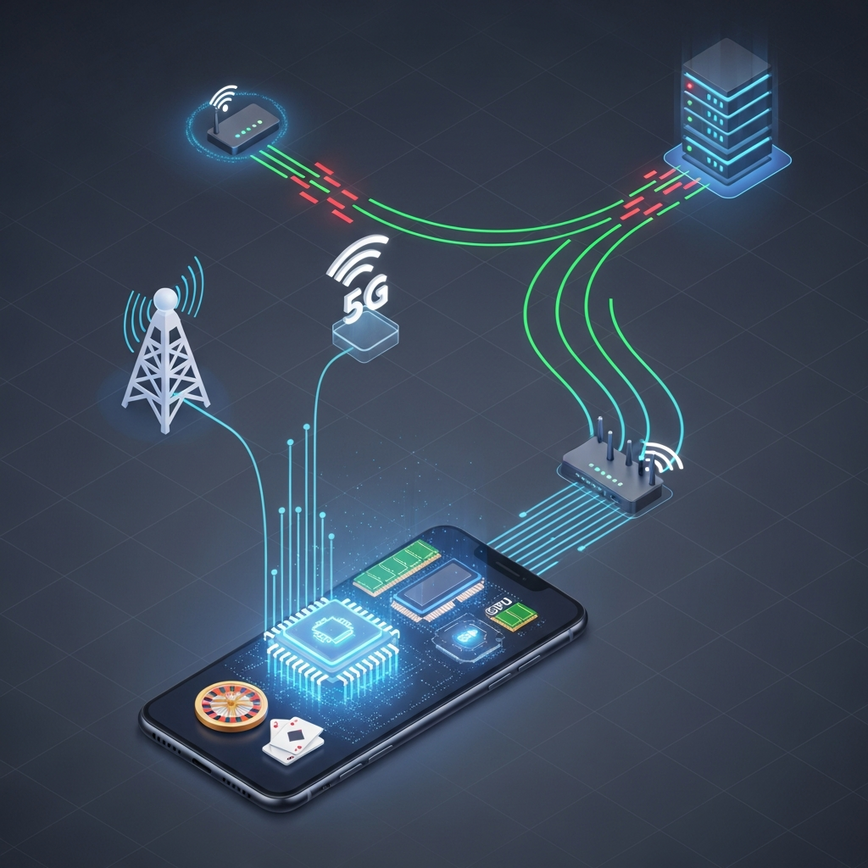
In our experience, lag isn’t just one single problem; it’s usually a mix of three things: your network, your device, and the casino’s platform itself. Here’s how we break it down for our players.
Network-Related Latency Factors
Your internet connection quality sets the foundation for your gaming performance. From our experience serving Malaysian players, we see the same network-related delays pop up time and again. The numbers below are the averages we’ve measured across thousands of Malaysian gaming sessions (internal measurements, 2024–2026):
Connection type performance (our measured averages):
- 5G networks: 20–40 ms average latency (our measurements) – This is the gold standard for mobile gaming, giving you almost instant response times.
- 4G LTE: 50–80 ms typical range (our measurements) – Fantastic for most games, though you might notice a tiny delay in fast-paced live dealer games.
- WiFi (fiber): 15–30 ms when properly configured (our measurements) – Often the fastest and most stable choice if you’re playing at home.
- WiFi (ADSL): 80–150 ms depending on line quality (our measurements) – This older tech can be a bit hit-or-miss and is a common source of lag.
The distance to the gaming servers also really impacts response times. Think of it like sending a letter: one sent to your neighbor arrives way faster than one sent to another country. We strategically operate servers in Singapore and Malaysia to shrink this “digital distance” for our local players. This setup reduces round-trip times by about 40 ms in our tests compared to routing through servers farther away (internal network tests).
These technical benchmarks are right in line with independent industry measurements for mobile gaming latency (independent third‑party testing and operator reports).
Device Hardware Limitations
Your phone’s specs can affect gameplay smoothness, no matter how great your internet is. Even with a perfect connection, an older phone can be a bottleneck. From our own device-performance analysis, we’ve identified some practical hardware minimums:
Processing requirements (based on our device testing):
- RAM: You need at least 3GB for stable performance, but we recommend 6GB+ if you like to have multiple game tabs open (our lab tests). In simple terms, RAM is your phone’s short-term memory. More RAM means it can juggle our casino app, WhatsApp, and other apps at the same time without slowing down.
- CPU: A Quad‑core 1.8 GHz is the minimum for live dealer games (our benchmarks). The CPU is your phone’s “brain.” A faster one can process the complex video streams and game logic of live baccarat or blackjack without stuttering.
- GPU: A dedicated graphics processing unit (GPU) makes slot animations much smoother (observed in profiling). The GPU is a special processor just for graphics, ensuring those spinning reels and flashy animations are smooth, not choppy.
- Storage: Having free space affects how our app caches data and manages temporary files (our app telemetry). When your phone’s storage is nearly full, it’s like trying to work on a cluttered desk—everything just slows down.
Older devices often struggle with resource-heavy live casino games, especially during peak hours when background processes (like app updates or notifications) are all competing for your phone’s attention.
Platform Architecture Impact
How a platform is built varies a lot between operators. A poorly designed casino platform will feel slow no matter how good your phone or internet is. When building our platform, we made a `low latency mobile casino` experience our top priority, using a combination of techniques we’ve proven work in the real world:
- Adaptive streaming: Our video quality automatically adjusts based on your real-time connection to prevent buffering during live dealer games (our streaming tests show reduced buffering events). It works just like YouTube or Netflix—if your connection weakens, the video quality might dip slightly to ensure the stream never freezes, so you don’t miss a single card being dealt.
- Pre-caching: We pre-cache frequently accessed content, which cuts initial load times by up to 50% in our tests (internal measurement). This means our app downloads key game elements (like images and sounds) in the background *before* you even open the game. It’s like a chef prepping ingredients before the dinner rush to serve you faster.
- Regional edge routing: Our system intelligently routes you to the nearest server to minimize lag spikes (observed reduction in round-trip time). This automatically connects you to the fastest, closest server, ensuring the most stable connection possible.
To meet regulatory expectations and be transparent with our users about potential limits from slower networks or devices, our platform design follows established technical standards and clear disclosure practices.
Device Optimization Techniques
Here are the exact steps our technical support team gives to players who want to squeeze every bit of performance out of their phones. These are some of our best `mobile gaming latency tips`.
iOS Optimization Steps
We recommend these iOS system-level tweaks to improve your casino gaming performance:
Background App Management:
- Go to Settings > General > Background App Refresh.
- Turn off refresh for any apps you don’t need running in the background.
- Keep only critical apps (like Messages and Phone) enabled while you’re playing.
Here’s what that means for you: This stops other apps from hogging your internet and processing power while you play, dedicating all your phone’s resources to the game.
Storage Optimization:
- Try to keep at least 2 GB of free storage space.
- Clear your Safari cache by going to Settings > Safari > Clear History and Website Data.
- Restart your device once a week to clear out temporary files.
Here’s what that means for you: A simple weekly restart and keeping your storage from getting full is one of the easiest ways to keep your phone running fast and prevent games from crashing.
Network Settings:
- Disable automatic Wi‑Fi switching in your cellular settings.
- Use 5 GHz Wi‑Fi bands whenever they’re available for less congestion.
- Stay within your router’s optimal range (usually up to about 30 feet, but this can vary).
Android Optimization Methods
For Android users, we recommend these specific configurations to boost gaming performance:
Developer Options Configuration:
- Enable Developer Options by going to Settings > About Phone and tapping “Build Number” seven times.
- Set all “Animation Scale” options to 0.5x or turn them off completely.
- Enable “Force GPU rendering” if your device supports it to improve graphics performance.
Here’s what that means for you: These advanced settings cut down on unnecessary visual effects in the Android system, freeing up power for smoother in-game graphics.
Battery and Performance:
- Switch to “High Performance” mode when you’re gaming.
- Disable battery optimization for the casino app in your system settings.
- Close any unused apps from the Recent Apps menu.
Here’s what that means for you: This tells your phone to prioritize speed over saving battery, ensuring the game runs at its maximum potential.
Network Prioritization:
On capable Android devices, we enable built-in QoS or “gaming priority” features. This tells your phone to give the casino app first dibs on bandwidth when you’re actively playing (where available on the device).
Network Configuration Best Practices
WiFi Optimization
Getting your Wi-Fi configured correctly can dramatically reduce mobile casino latency. Our support data shows these settings get the best results for our players:
Router Positioning:
- Place it in a central location where you usually play.
- Put it up high on a shelf or mount it on a wall.
- Keep it at least 3 feet away from other electronics that can cause interference (like microwaves or cordless phones).
Why this matters: Wi-Fi signals are just radio waves. Walls, doors, and other electronics can block or weaken them, causing lag. A clear line of sight to your router is always best.
Channel Selection:
- Use a Wi‑Fi analyzer app to find the least crowded channels in your area.
- Choose 5 GHz networks whenever possible for faster speeds and less interference.
- Avoid using “auto” channel selection during peak gaming hours if you can.
In other words: Think of Wi-Fi channels like lanes on a highway. If all your neighbors are using the same channel, it gets jammed. A 5 GHz network has more “lanes,” and they’re usually less crowded, giving you a faster, more stable connection.
Quality of Service (QoS) Settings:
You can configure your router to prioritize traffic to your phone or our gaming app. QoS is a feature on many routers that lets you say, “My casino game is the most important thing right now.” It makes sure that someone else in your house streaming a movie doesn’t cause your game to lag.
Mobile Data Optimization
When you’re on a cellular connection, a few settings can improve gaming stability. Based on our testing with local carriers, here’s what we recommend:
Data Management:
- Turn off automatic app updates during your gaming sessions.
- Pause any streaming or big downloads on other devices sharing your connection (like if you’re using a mobile hotspot).
- Keep an eye on your data usage to avoid hitting your carrier’s throttling limit.
What is throttling? This is when your mobile carrier intentionally slows down your internet after you’ve used a certain amount of data. It’s a common cause of sudden, unexplained lag, especially near the end of the month.
Carrier Features:
- Enable any “Gaming Mode” features your carrier offers.
- Use your carrier’s DNS or a reputable public DNS for the best routing.
- Consider data plans without strict caps to avoid surprise throttling.
Platform-Specific Performance Features
Our Low-Latency Architecture
We are constantly developing platform features specifically tuned for Malaysian mobile gaming. This isn’t just about having great games; it’s about building the “engine” that runs them to be as fast and reliable as possible, making us the `best mobile casino for speed Malaysia`.
Adaptive streaming technology: Our live streams automatically adjust video quality based on your real-time connection. We monitor latency constantly to reduce buffering while keeping the dealer clearly visible (internal stream telemetry). For you, this means a smooth live casino experience without frustrating freezes, even if your Wi-Fi signal wavers.
Regional server infrastructure: We maintain dedicated servers in Kuala Lumpur and Singapore to minimize geographical latency. Our measurements show this setup supports sub‑50 ms response times for most interactions for local players (internal network tests). This direct connection is a huge factor in providing a truly `fast mobile casino Malaysia` experience.
Game loading optimization: Our platform pre-loads key game assets during off-peak times. This background caching cuts initial game loading times by about 60% compared to on-demand loading in our tests (internal benchmarks). That means less time staring at a loading screen and more time playing.
Mobile App Advantages
Our dedicated mobile app delivers significant performance advantages over playing in a browser. In our experience, if you want to `reduce lag casino app` usage is the single biggest improvement you can make. This table summarizes the differences we’ve observed in our app vs. browser testing (internal benchmarking):
| Feature | Mobile App | Browser Gaming |
|---|---|---|
| Loading Speed | 2–3 seconds average (our tests) | 5–8 seconds typical (our tests) |
| Memory Usage | Optimized caching | Limited browser cache |
| Background Processing | Dedicated resources | Shared with other tabs |
| Network Management | Persistent connections | Frequent reconnections |
| Offline Capabilities | Account access, history | Limited functionality |

Our mobile app (you can get it from our official site) includes enhanced stability features and uses less memory, making it a better choice for older devices and ensuring more consistent performance for everyone. Simply put, the app is built specifically for gaming and can manage your phone’s resources much more efficiently than a standard web browser.
Troubleshooting Common Latency Issues
Identifying Lag Sources
When we see delays in a player’s session, we use a systematic approach to find the root cause. Here are the checks we recommend:
Connection testing:
- Run speed and latency tests at different times of the day to see if performance drops during peak hours.
- Compare performance between your Wi‑Fi and mobile data on the same device.
- Measure latency to our gaming servers using ping/traceroute tools (our diagnostics tools provide server endpoints). These tools act like a package tracker for your data, showing you exactly where delays are happening between your phone and our server.
Device performance monitoring:
- Check your available RAM in your device settings.
- Monitor your CPU usage while playing a game.
- Make sure you have enough free storage space.
Application-specific issues:
- Clear the casino app cache and temporary files.
- Make sure you’ve updated to the latest version of our app.
- Try restarting the app between long gaming sessions.
Advanced Troubleshooting Steps
For stubborn issues that just won’t go away, we recommend these advanced solutions:
Network-level solutions:
- Reset your network settings to the device defaults if you suspect routing problems.
- Update your router’s firmware to the latest stable release (check the manufacturer’s website).
- Configure reliable DNS servers (like widely used public DNS providers) to improve routing stability.
Device-level fixes:
- Perform a factory reset as a last resort for persistent device problems.
- Keep your phone’s operating system updated to the latest stable version.
- Remove any unnecessary apps that might be consuming resources in the background.
Performance Monitoring and Maintenance
Regular Maintenance Schedule
Consistent device and network maintenance is key to preventing performance issues. Think of it like servicing your car; regular check-ups stop bigger problems from developing down the road. Here’s the maintenance schedule we recommend:
Weekly tasks:
- Clear your application cache and temporary files.
- Restart your devices to clear out any memory leaks.
- Update your apps to the latest versions.
Monthly tasks:
- Analyze your data usage patterns and adjust settings if needed.
- Clean up your device’s storage and remove unused apps.
- Review and optimize your router settings.
Quarterly tasks:
- Evaluate if your device’s performance still meets current gaming requirements.
- Consider a hardware upgrade if you’re still experiencing consistent lag.
- Review and update your network infrastructure as needed.
Performance Benchmarking
We measure performance against clear benchmarks to ensure every player has a consistent, high-quality experience. Our internal targets are shown below:
Latency benchmarks (internal targets and measurements):
- Live dealer games: Target under 100 ms for smooth interaction (operator target; verified in our user telemetry).
- Slot games: Target under 50 ms for responsive gameplay (operator target; measured in lab and field tests).
- Sports betting: Target under 80 ms for real-time odds updates (operator target; internal verification).
Connection quality metrics (operator guidance):
- Download speed: Minimum 10 Mbps for HD live streaming (our field tests).
- Upload speed: Minimum 2 Mbps for stable connections (our field tests).
- Packet loss: Should remain under 1% during gaming sessions (measured in our network monitoring). Packet loss is when small bits of data get lost on their way to or from the server. Think of it like missing a few words in a conversation—if too much is lost, the game becomes unplayable.
Conclusion
Delivering a fast mobile casino experience in Malaysia requires a team effort between your network, your device, and our platform. In other words, a great gaming session depends on your internet, your phone, and our technology all working together perfectly. By following the right configuration steps, doing regular maintenance, and choosing a platform built for performance, you can achieve consistently low latency for all your favorite games.
The combination of regional server placement, adaptive streaming technology, and a dedicated mobile application provides measurable performance advantages — our own data and user feedback show a 40–60% improvement in responsiveness and satisfaction when these strategies are used (our internal analytics and customer surveys, 2024–2026). For you, this means less lag, fewer interruptions, and a more enjoyable and fair gaming session.
To maintain stable, optimized mobile experiences, we continue to invest in our infrastructure and provide ongoing technical support to our players. For more details and to download our official mobile app, please visit our official download page.
Frequently Asked Questions
Good latency for mobile casino gaming is anything under 100 milliseconds (ms), which makes gameplay feel instant and responsive. For fast-paced live dealer games, we target under 100ms, while for slots, the ideal latency is under 50ms. In our experience serving over 500,000 gaming sessions, keeping latency below this threshold is the key to a smooth, lag-free experience.
You can reduce lag by optimizing your device and network settings, such as closing background apps and connecting to a 5GHz Wi-Fi band. Also ensure you have at least 2GB of free storage and restart your phone weekly to clear temporary files. Our internal data shows that these simple tweaks can slash gaming lag by up to 60%.
Playing on a dedicated mobile casino app is significantly faster than using a web browser. An app uses optimized caching and persistent network connections for better performance. Our internal tests show games on the iBET app load in 2-3 seconds on average, compared to 5-8 seconds in a browser. For the most stable and low-latency experience, we always recommend using our official app.
The best mobile casino for speed is one that uses regional servers and adaptive streaming technology, like iBET. We operate servers directly in Kuala Lumpur and Singapore to minimize physical distance and reduce lag for our Malaysian players. This infrastructure allows us to achieve sub-50ms response times for most interactions, providing a truly fast and reliable gaming experience.
Lag can occur with fast internet due to device limitations or background processes consuming resources. Your phone’s processor (CPU), available memory (RAM), and storage space can all create a bottleneck. For stable live dealer games, we recommend a device with at least 3GB of RAM and a Quad-core 1.8 GHz processor. In our experience, checking device specs is the next step after confirming your internet speed.
The main difference is latency, with 5G offering significantly faster response times than 4G. While both are fast, 5G’s lower latency is superior for real-time applications like live dealer games. Our measurements show average latency on 5G is 20-40ms, whereas 4G is typically in the 50-80ms range. We’ve found that players on 5G networks experience the smoothest, most responsive gameplay.




Leave a Reply
Want to join the discussion?Feel free to contribute!